Managing Documents
Use the document list and document endpoints to find, organize, correct, and delete documents.
Find documents in Shipwell
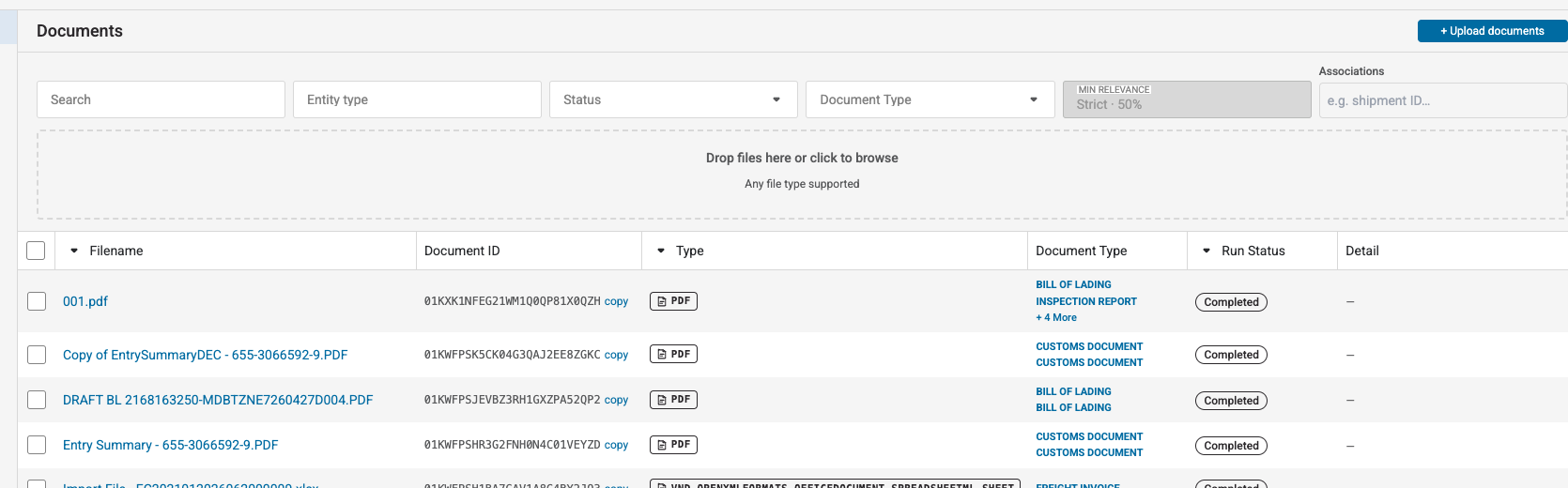
The Document AI list shows each document's filename, type, associations, status, and latest processing information.
Use filters to narrow the list, then open a document to view its metadata, run history, and latest results.
List documents through the API
curl --get \
  "https://sandbox-api.shipwell.com/document-store/documents" \
  -H "Authorization: Token <user-token>" \
  --data-urlencode "status=completed" \
  --data-urlencode "entity_type=shipment" \
  --data-urlencode "entity_id=SW-1001" \
  --data-urlencode "sort_by=created_at" \
--data-urlencode "sort_direction=desc"import requests
response = requests.get(
"https://sandbox-api.shipwell.com/document-store/documents",
headers={"Authorization": "Token <user-token>"},
params={
"status": "completed",
"entity_type": "shipment",
"entity_id": "SW-1001",
"sort_by": "created_at",
"sort_direction": "desc",
},
timeout=30,
)
response.raise_for_status()
documents = response.json()Available filters include:
-
entity_typeandentity_id -
status -
content_type -
document_type -
created_from— inclusive RFC 3339 timestamp -
created_to— exclusive RFC 3339 timestamp
Repeat list filters such as status to include multiple values.
Sorting supports filename, created_at, status, and content_type. Results default to 20 per page and support up to 100.
Retrieve one document
Use GET /document-store/documents/{id} to retrieve one document.
The response includes:
- Source file metadata
- Document status and skip reason
- Description
- Associations
- Latest run summary
- Latest result summaries
- Creation and update timestamps
Update description and associations
PATCH /documents/{id} is a partial update. Provide only the fields that should change.
curl -X PATCH \
  "https://sandbox-api.shipwell.com/document-store/documents/<document-id>" \
  -H "Authorization: Token <user-token>" \
  -H "Content-Type: application/json" \
  -d '{
    "description": "Signed proof of delivery for shipment SW-1001",
    "associations": [
      {"entity_type": "shipment", "entity_id": "SW-1001"}
    ]
}'import requests
response = requests.patch(
"https://sandbox-api.shipwell.com/document-store/documents/<document-id>",
headers={"Authorization": "Token <user-token>"},
json={
"description": "Signed proof of delivery for shipment SW-1001",
"associations": [
{"entity_type": "shipment", "entity_id": "SW-1001"}
],
},
timeout=30,
)
response.raise_for_status()
document = response.json()The associations array replaces the complete current array. Send [] to clear all associations.
Correct an extracted value
Human corrections can be added to the latest result:
Send schema_corrections in PATCH /document-store/documents/{id}.
A correction supports:
-
name— schema result to correct -
value— corrected value -
page_number— optional source page -
json_schema— optional schema contract -
prompt— optional extraction context -
source_regions— optional normalized source locations
Corrections require an existing result. The endpoint returns no_result when the document has not produced one.
Validate corrected values in the same way as automatically extracted values.
List observed document types
Retrieve document types found in your company's latest completed results:
Use GET /document-store/documents/document-types.
Use this list to populate a document-type filter without hardcoding values.
Delete a document
Use DELETE /document-store/documents/{id}. A successful request returns 204 No Content.
Deletion removes the document from customer-facing list, retrieval, search, and inspection operations. Treat deletion as irreversible from your integration's perspective.