Getting Started
This guide walks through processing a document with a platform-managed configuration and reviewing the resulting data.
Prerequisites
- A Shipwell account with Document AI enabled
- Access to the Shipwell Sandbox
- A valid Shipwell user token
- A synthetic or non-sensitive PDF for testing
Step 1: Choose a platform-managed configuration
In Shipwell:
- Open Document AI .
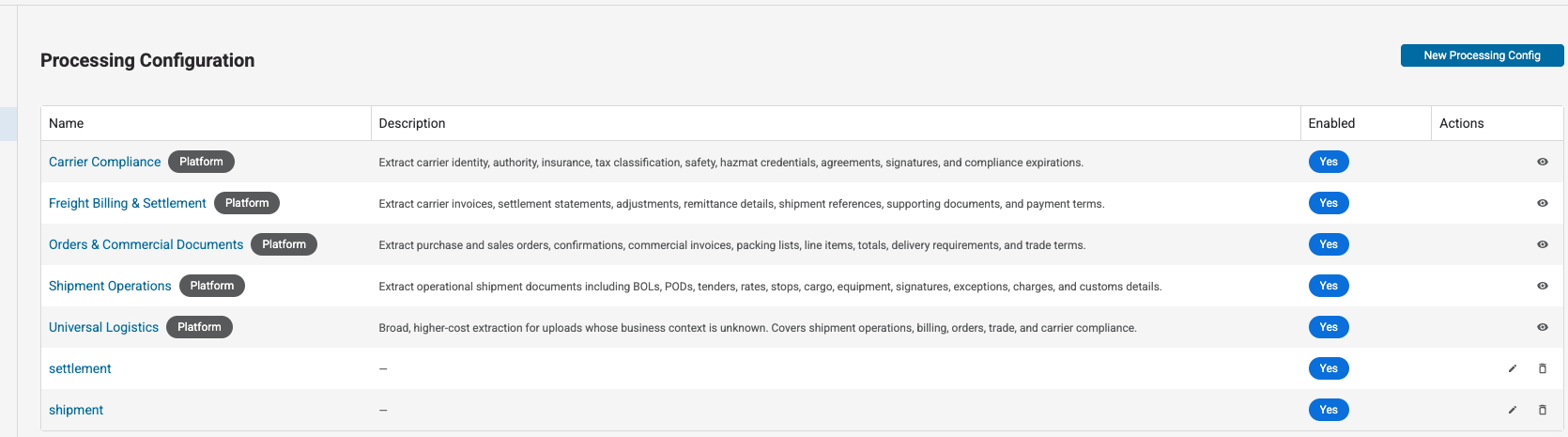
- Select Configuration .
- Open Processing Configuration .
- Find a configuration marked Platform .
- Open the configuration to review what it extracts and which processing features it enables.
Platform-managed configurations are maintained by Shipwell and are read-only. See Platform-Managed Configurations.
Step 2: Upload and process a document
- Return to the Document AI document list.
- Select Upload documents .
- Add your test document.
- In Upload behavior , select the platform-managed configuration.
- Review the upload and submit it.
Only enabled configurations appear in the upload selector.
Step 3: Monitor processing
After upload, the document appears in the document list. Processing is asynchronous, so the status changes as work progresses.
Common statuses are:
-
pending— processing has been requested -
processing— processing is in progress -
completed— results are ready -
failed— processing did not complete -
skippedoroversized— the file was stored but was not eligible for the requested processing
Open the document to view its latest processing status and progress.
Step 4: Review the results
When processing completes:
- Open the document.
- Select its latest run.
- Review the summary and extracted schemas.
- Select an extracted value to inspect its source when source regions are available.
The exact result depends on the selected configuration. See Reading Results.
API equivalent
Upload one document with a known processing configuration:
curlpython
curl -X POST "https://sandbox-api.shipwell.com/document-store/documents" \
  -H "Authorization: Token <user-token>" \
  -F 'payload={
    "processing_config_id": "<processing-config-id>",
    "files": [{"filename": "sample-bol.pdf"}]
  }' \
-F "files=@sample-bol.pdf"import json
import requests
with open("sample-bol.pdf", "rb") as document_file:
response = requests.post(
"https://sandbox-api.shipwell.com/document-store/documents",
headers={"Authorization": "Token <user-token>"},
data={
"payload": json.dumps(
{
"processing_config_id": "<processing-config-id>",
"files": [{"filename": "sample-bol.pdf"}],
}
)
},
files={"files": ("sample-bol.pdf", document_file, "application/pdf")},
timeout=60,
)
response.raise_for_status()
document = response.json()["documents"][0]Use the returned document id to monitor processing or retrieve results.
Next steps
- Learn how to choose a processing configuration
- Review every upload option in Uploading Documents
- Learn how processing works
- Learn how to create new runs and reprocess documents