Platform-Managed Configurations
Platform-managed configurations are reusable processing configurations maintained by Shipwell. Use them when their description matches your document workflow and you do not need custom extraction instructions.
Identify a platform-managed configuration
In Shipwell, platform-managed configurations:
- Display a Platform badge
- Open in read-only mode
- Can be selected for uploads and manual processing when enabled
- Cannot be edited or deleted by your company
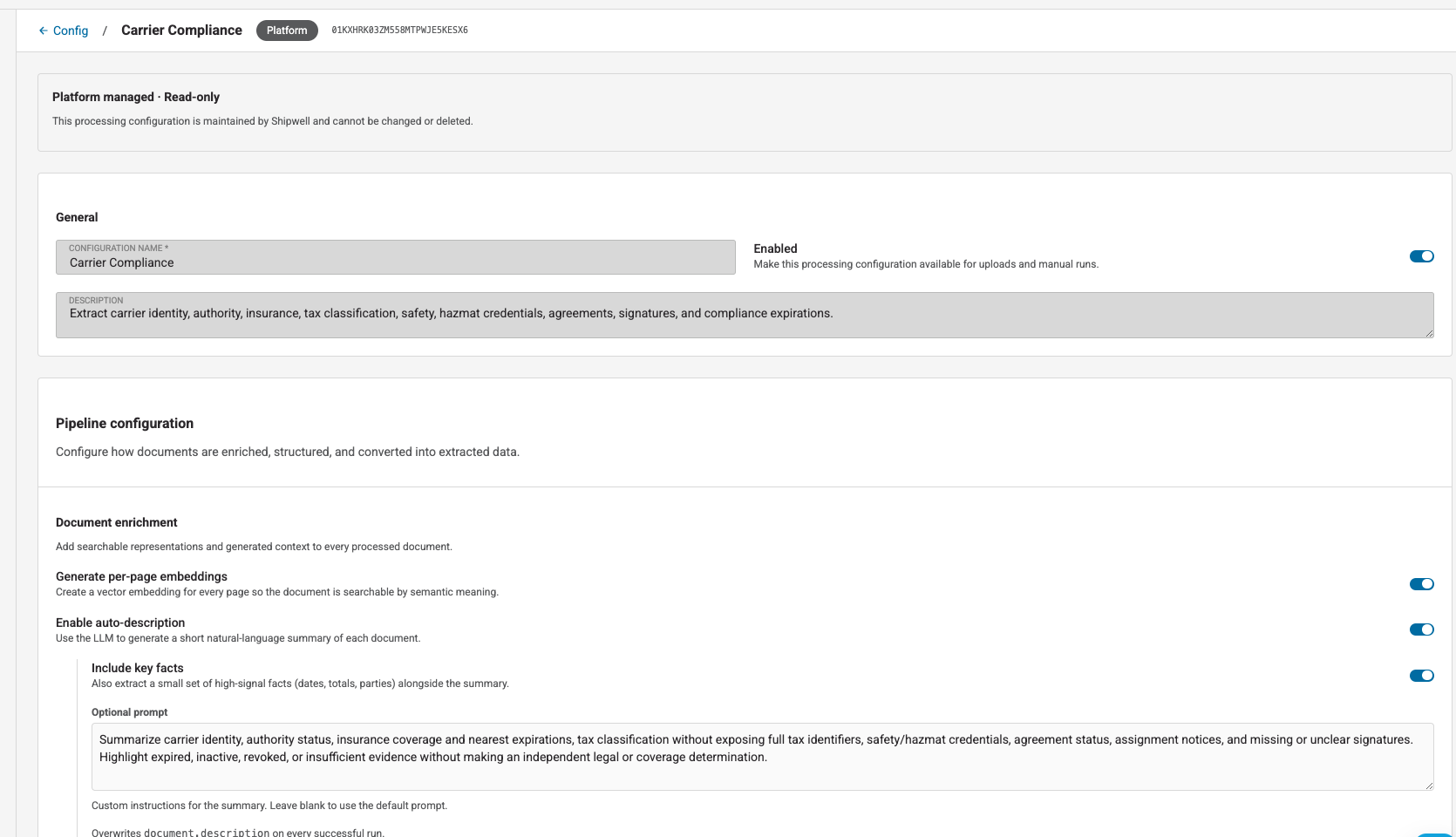
In the API, platform-managed configurations have:
{
  "enabled": true,
  "is_platform_managed": true
}
Available configurations
Shipwell provides five platform-managed configurations:
- Shipment Operations — bills of lading, proofs of delivery, tenders, rates, stops, cargo, equipment, signatures, exceptions, charges, and customs details
- Freight Billing & Settlement — carrier invoices, settlement statements, adjustments, remittance details, shipment references, supporting documents, and payment terms
- Orders & Commercial Documents — purchase and sales orders, confirmations, commercial invoices, packing lists, line items, totals, delivery requirements, and trade terms
- Carrier Compliance — carrier identity, authority, insurance, tax classification, safety, hazmat credentials, agreements, signatures, and compliance expirations
- Universal Logistics — broad extraction across shipment operations, billing, orders, trade, and carrier compliance when the business context is unknown
Prefer a specialized configuration whenever you know the workflow, even when you do not know the exact document type. A document can reasonably fit more than one configuration; your selection defines the extraction intent.
Use Universal Logistics when the context is genuinely unknown. Its broader coverage can take longer and be less precise than a specialized configuration.
Common capabilities
Every platform-managed configuration:
-
Classifies the primary
document_type -
Extracts structured
signatureresults - Splits eligible compound PDFs into logical result slices
- Generates a document description and key facts
- Generates searchable representations for semantic search
- Includes source regions for supported structured values
The difference is extraction intent: each specialized configuration asks for a different set of business facts.
Configuration comparison
| Capability | Shipment Operations | Freight Billing & Settlement | Orders & Commercial | Carrier Compliance | Universal Logistics |
|---|---|---|---|---|---|
| Document classification | ✓ | ✓ | ✓ | ✓ | ✓ |
| Structured signatures | ✓ | ✓ | ✓ | ✓ | ✓ |
| Shipment stages, stops, cargo, and equipment | ✓ | — | — | — | ✓ |
| Shipment events, exceptions, and delivery outcomes | ✓ | — | — | — | ✓ |
| Rates, charges, weights, temperature, seals, and customs | ✓ | Partial | Partial | — | ✓ |
| Invoices, settlements, adjustments, and payment terms | Partial | ✓ | — | — | ✓ |
| Purchase orders, line items, totals, and delivery requirements | — | — | ✓ | — | ✓ |
| Commercial trade and shipping terms | Partial | — | ✓ | — | ✓ |
| Carrier identity, authority, insurance, and tax profile | Partial | Partial | — | ✓ | ✓ |
| Carrier agreements, assignments, safety, and hazmat | — | — | — | ✓ | ✓ |
| Best when business context is unknown | — | — | — | — | ✓ |
Partial means the configuration extracts the information only where it supports that configuration's primary workflow.
Structured outputs by configuration
These are the stable result names consumers see in schemas[].name. The value behind each name can be a string, object, or repeated result.
Shipment Operations
18 structured outputs:
| Result name | What it provides |
|---|---|
document_type |
Operational role, such as bill of lading, proof of delivery, rate confirmation, receipt, report, or trade document |
shipment_stage |
Planning, tendered, picked up, in transit, delivered, billing, exception, or customs stage |
shipment_identifier |
BOL, PRO, load, shipment, tracking, order, booking, container, seal, and related references |
shipment_party |
Shipper, consignee, carrier, broker, buyer, seller, and other shipment parties |
shipment_stop |
Pickup, delivery, and intermediate stop details |
cargo_item |
Commodities, quantities, weights, dimensions, and handling details |
equipment |
Trailer, container, tractor, chassis, and seal information |
shipment_event |
Planned and actual shipment events |
signature |
Execution role, signature status, signer details, date, method, and source |
shipment_exception |
Delay, shortage, damage, refusal, temperature, customs, and other exceptions |
delivery_outcome |
Delivery completion, acceptance, refusal, and discrepancy information |
rate_terms |
Negotiated transportation terms and rate context |
charge |
Transportation and accessorial charges |
invoice_summary |
Invoice identifiers, parties, dates, and totals |
weight_measurement |
Gross, tare, net, and related weight measurements |
temperature_record |
Required and observed temperature information |
customs_detail |
Customs, origin, tariff, and trade information |
seal_event |
Seal application, inspection, change, and removal |
Freight Billing & Settlement
12 structured outputs:
document_type, billing_identifier, billing_party, shipment_reference, charge, settlement_adjustment, invoice_summary, settlement_summary, payment_terms, supporting_document_status, tax_summary, and signature.
Use this configuration when the main question is what was billed, adjusted, approved, supported, or paid.
Orders & Commercial Documents
11 structured outputs:
document_type, order_identifier, order_party, order_line, order_totals, order_date, shipping_terms, delivery_requirement, commercial_trade_detail, order_status, and signature.
Use this configuration for purchase and sales orders, confirmations, commercial invoices, packing lists, and trade documents.
Carrier Compliance
12 structured outputs:
document_type, carrier_identity, authority_record, insurance_policy, tax_profile, agreement_summary, compliance_expiration, signature, carrier_contact, notice_of_assignment, safety_record, and hazmat_credential.
Use this configuration for onboarding, authority, insurance, agreements, tax forms, safety, and credential review.
Universal Logistics
Universal Logistics contains the union of the specialized output names, with duplicate concepts represented once. It is intentionally broad and should not replace a specialized configuration when the workflow is known.
See Reading Results for how to consume these result names and Signatures for the difference between structured signature results and detected signature regions.
Review a configuration before using it
Open the configuration and review:
- Its name and description
- Whether document splitting is enabled
- Whether descriptions and key facts are generated
- Whether semantic search is enabled
- The extraction schemas and their expected result shapes
A configuration's description explains its intended use. Do not select a configuration based only on its name.
Select it during upload
In the upload workflow, open Upload behavior and choose the named configuration marked Platform. Its settings apply to every file in that upload.
Through the API, pass the configuration id:
{
  "processing_config_id": "<platform-processing-config-id>",
  "files": [
    {"filename": "sample-document.pdf"}
  ]
}
Select it when reprocessing
Apply the configuration's id through POST /document-store/runs.
A new processing run is created for every accepted document. Previous runs remain available in the document's run history.
See Runs and Reprocessing for the request example.
API permissions
You can retrieve and use a visible platform-managed configuration. Attempts to update or delete one return 403 with reason platform_config_immutable.
If a configuration is unavailable to your account, retrieval and selection return 404.
When you need different behavior
If no platform-managed option matches your workflow, create a Custom Configuration. Custom configurations let your company define schemas and processing features while keeping the platform responsible for underlying model selection.