Custom Configurations
Create a custom processing configuration when your company needs a repeatable extraction or enrichment workflow.
Create a configuration in Shipwell
- Open Document AI .
- Select Configuration .
- Open Processing Configuration .
- Select New Processing Config .
- Enter a unique name and a description that tells users when to select it.
- Leave Enabled selected if the configuration should immediately appear in upload and processing workflows.
- Select Create .
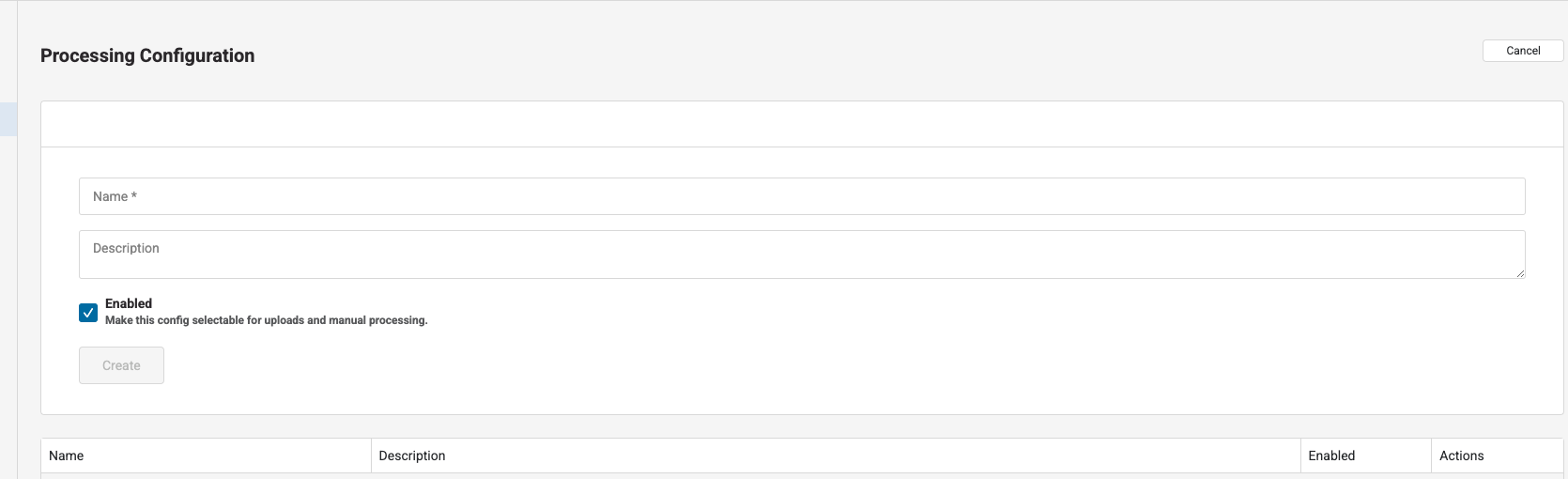
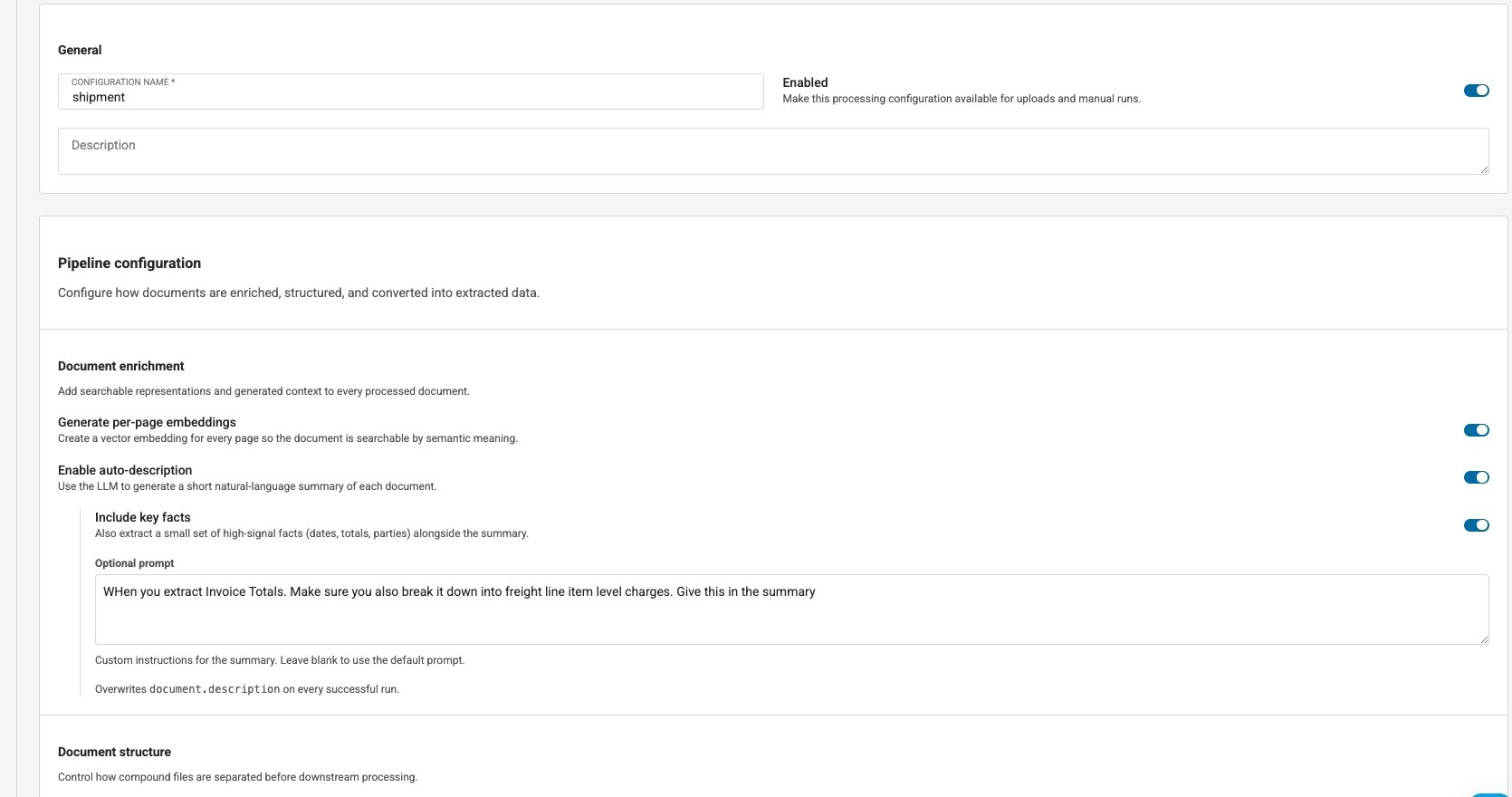
After creation, configure document enrichment, document structure, and extraction schemas.
Configure document enrichment
Generate per-page embeddings
Enable embeddings when users or integrations should be able to find processed documents by meaning. A document must have embeddings to appear in semantic search results.
Enable auto-description
Enable auto-description to generate a concise natural-language description after a successful run.
You can also:
- Include key facts such as important dates, totals, and parties
- Add an optional prompt to tailor the description
The generated description becomes the document's current description after a successful run.
Configure document structure
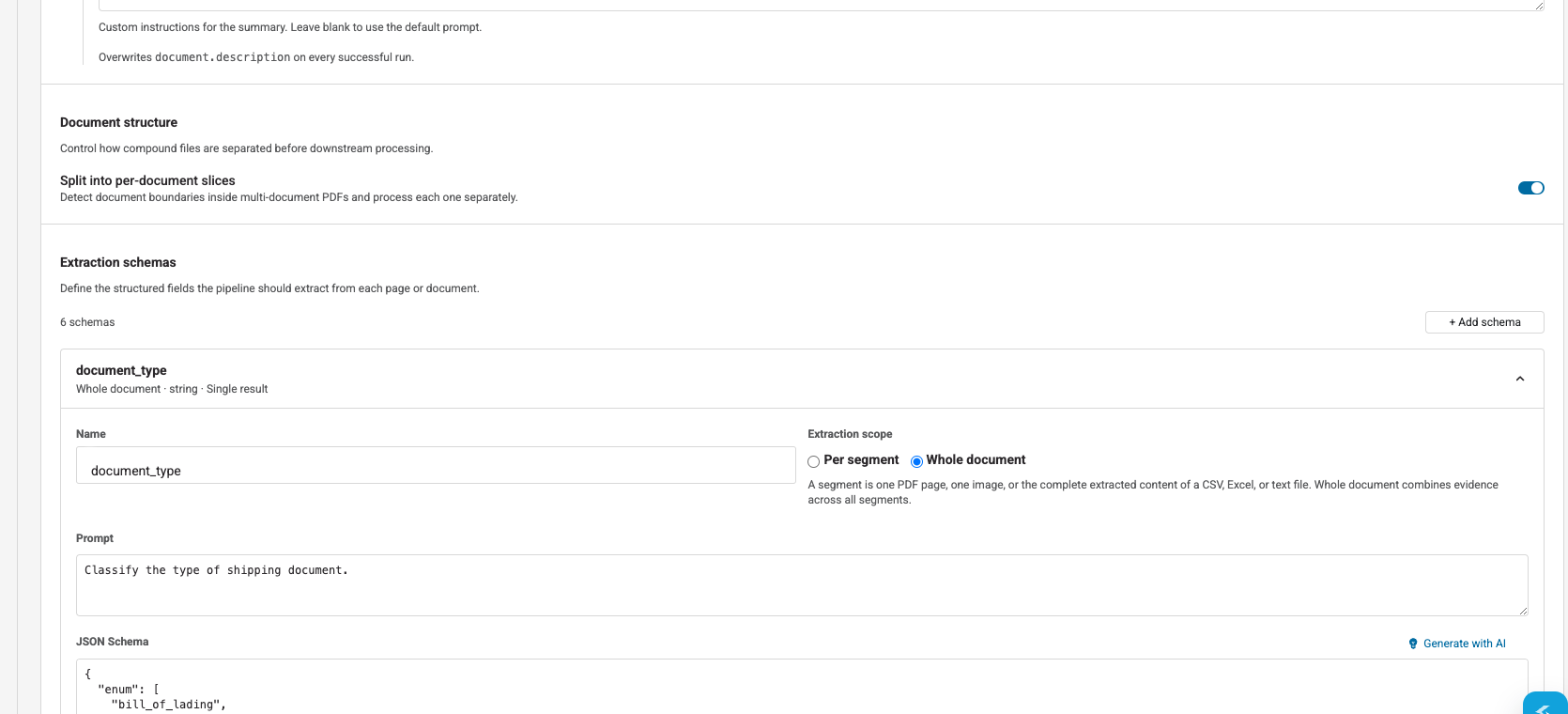
Enable Split into per-document slices when a single PDF may contain multiple logical documents, such as an invoice followed by a proof of delivery.
Splitting applies to eligible PDFs. Each detected logical document is returned as a separate result while remaining associated with the uploaded parent document.
Add extraction schemas
An extraction schema tells Document AI what value to find and what JSON shape to return.
For each schema:
- Enter a stable, machine-readable name.
- Write a focused extraction prompt.
- Define the expected value with JSON Schema.
- Choose whether extraction applies to each segment or the whole document.
- Choose whether to return one result or multiple results.
- Enable source regions if users need to locate the value on a PDF or image.
For example:
{
  "name": "purchase_order_number",
  "prompt": "Extract the purchase order number. Return null when it is not present.",
  "json_schema": {
    "type": ["string", "null"]
  },
  "scope": "document",
  "result_cardinality": "single",
  "include_source_regions": true
}
See Extraction Schemas for schema design, JSON shapes, scope, cardinality, source regions, and the schema-generation helper.
Save and test
- Select Save changes .
- Upload a representative synthetic document.
- Select your custom configuration in Upload behavior .
- Review every extracted value and its source.
- Test missing values, repeated values, and documents with different layouts.
Do not test with production-sensitive documents in a sandbox environment.
Manage availability
Disable a configuration to prevent it from being selected for new uploads and manual runs. Existing run history and results are not changed.
Delete a custom configuration only when it is no longer needed. Platform-managed configurations cannot be deleted.
Create a configuration through the API
curl -X POST "https://sandbox-api.shipwell.com/document-store/configs/processing-configs" \
  -H "Authorization: Token <user-token>" \
  -H "Content-Type: application/json" \
  -d '{
    "name": "Purchase order extraction",
    "description": "Extracts purchase order identifiers and totals.",
    "enabled": true,
    "pipeline_config": {
      "schemas": [
        {
          "name": "purchase_order_number",
          "prompt": "Extract the purchase order number. Return null when absent.",
          "json_schema": {"type": ["string", "null"]},
          "scope": "document",
          "result_cardinality": "single",
          "include_source_regions": true
        },
        {
          "name": "total_amount",
          "prompt": "Extract the total amount and currency.",
          "json_schema": {
            "type": ["object", "null"],
            "properties": {
              "amount": {"type": "number"},
              "currency": {"type": "string"}
            },
            "required": ["amount", "currency"],
            "additionalProperties": false
          },
          "scope": "document",
          "result_cardinality": "single"
        }
      ],
      "split": false,
      "embed": true,
      "describe": {
        "enabled": true,
        "key_facts": true
      }
    }
}'import requests
payload = {
"name": "Purchase order extraction",
"description": "Extracts purchase order identifiers and totals.",
"enabled": True,
"pipeline_config": {
"schemas": [
{
"name": "purchase_order_number",
"prompt": "Extract the purchase order number. Return null when absent.",
"json_schema": {"type": ["string", "null"]},
"scope": "document",
"result_cardinality": "single",
"include_source_regions": True,
},
{
"name": "total_amount",
"prompt": "Extract the total amount and currency.",
"json_schema": {
"type": ["object", "null"],
"properties": {
"amount": {"type": "number"},
"currency": {"type": "string"},
},
"required": ["amount", "currency"],
"additionalProperties": False,
},
"scope": "document",
"result_cardinality": "single",
},
],
"split": False,
"embed": True,
"describe": {"enabled": True, "key_facts": True},
},
}
response = requests.post(
"https://sandbox-api.shipwell.com/document-store/configs/processing-configs",
headers={"Authorization": "Token <user-token>"},
json=payload,
timeout=30,
)
response.raise_for_status()
configuration = response.json()Names must be unique within your company.
Update or delete through the API
Use PATCH /document-store/configs/processing-configs/{id} to update only the fields that should change.
Use DELETE /document-store/configs/processing-configs/{id} to delete a company-owned configuration. A successful delete returns 204 No Content.