Carrier Rules & Markup
Once a carrier is connected, two optional settings control how that carrier is used and priced: Carrier Rules and Custom Markup. Both are configured in the Shipwell application. Carrier Rules apply automatically to rating and dispatch, in the application and through the API. Custom Markup applies to rates shown in the Shipwell application only: rates returned by the Rating API are the carrier's quoted price, so apply your own markup when you price for your customers.
Carrier Rules
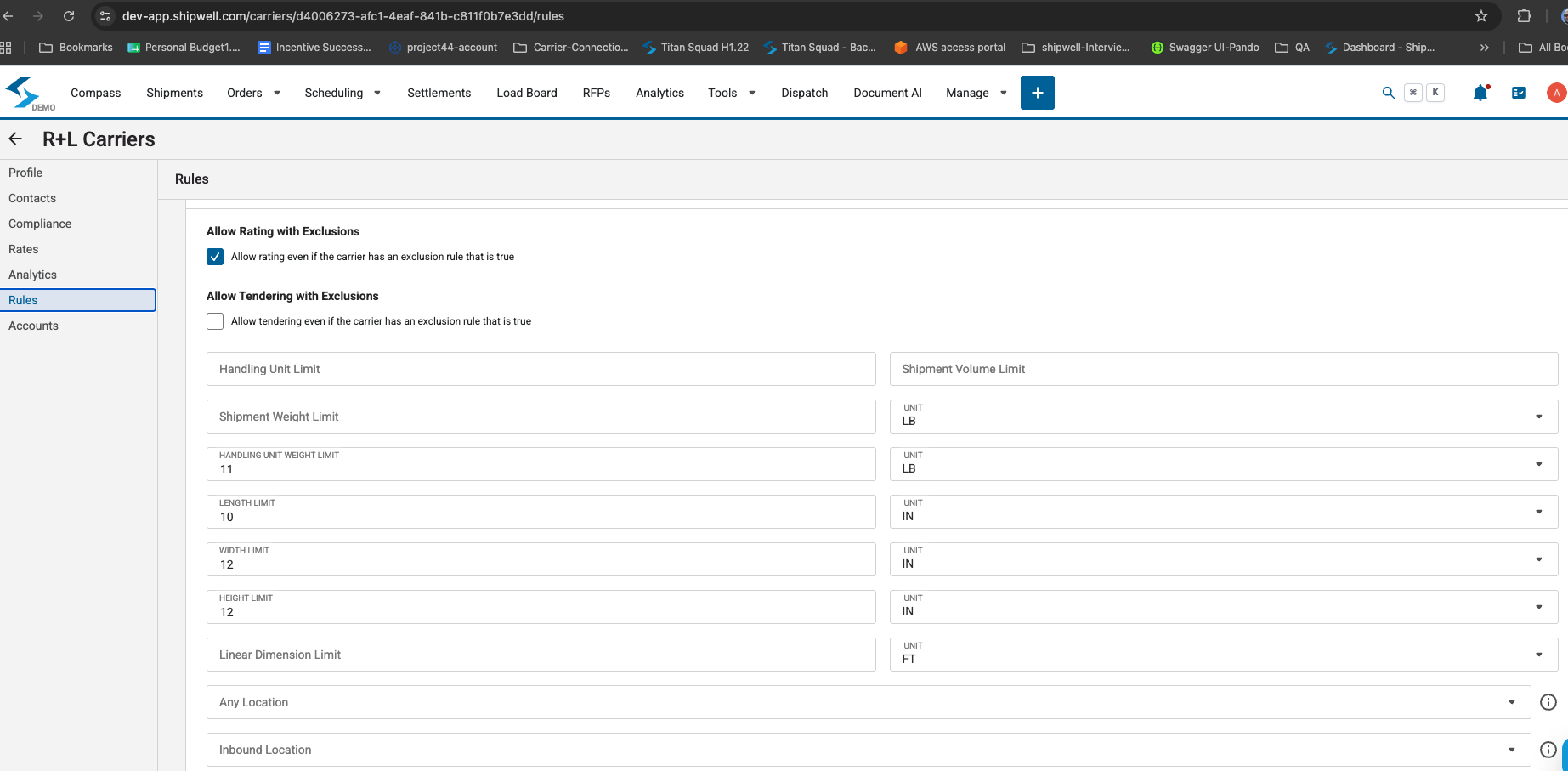
Carrier Rules scope when a connected carrier account should (and shouldn't) be used, on the carrier's Rules tab in the Shipwell application. You can set limits such as:
- Weight and dimensions — shipment weight, handling unit weight, length, width, height, and linear dimension limits.
- Volume — a shipment volume limit.
- Location — restrict the account to inbound shipments, outbound shipments, or any location.
A shipment that falls outside these limits is treated as an exclusion for that carrier account. Two separate toggles then control whether an exclusion actually blocks the account from being used:
- Allow Rating with Exclusions — when off, an excluded shipment won't get a rate from this account. Turn this on to still get a rate anyway.
- Allow Tendering with Exclusions — the same, but for dispatch. When off, an excluded shipment can't be tendered to this account.
Carrier Rules apply automatically once set — you don't need to check them yourself before rating or dispatching.
Custom Markup
Custom Markup automatically adjusts the rate a customer sees on top of what a carrier quotes — useful if you're rebilling capacity to your own customers. A markup rule can apply:
- By carrier or customer — include or exclude specific carriers or customers.
- By shipment characteristics — freight class, weight range, distance range, or quote value range.
- As a flat fee or a percentage — with amounts that can vary by currency.
Rules are evaluated in priority order, and only active rules apply. Like Carrier Rules, markup is applied automatically to matching rates — you don't need to calculate or apply it yourself.
Note
Custom Markup applies to rates shown in the Shipwell application. Rates returned by the Rating API are the carrier's own price, with no markup applied: the charges on each rate is exactly what the carrier quoted. If you rebill through the API, apply your markup in your own system.
Note
Carrier Rules and Custom Markup are configured per Shipwell account, not per API request. Contact your Shipwell representative if you'd like help setting either one up.