Tracking Webhooks
Tracking webhooks push tracking changes to your own system as they happen, so you don't have to poll. Register your URL once. From then on, whenever the tracking of freight you booked through POST /dispatching/jobs changes, Shipwell sends the shipment's full, current tracking to that URL, signed so you can prove it came from Shipwell.
Each delivery carries the same tracking that GET /tracking/timelines/{resource_id} returns under data, with the whole timeline in one document instead of paged. Everything on the Tracking page about reading it applies here too.
How it works
-
Register your URL, once.
Shipwell returns a signing
secret. Store it: it is shown only this once. -
Send a test, once.
Shipwell sends a signed test event to your URL right away and tells you what your endpoint answered. A
2xxproves Shipwell reached your endpoint through your firewall and TLS. Make your handler reject a bad signature, so a2xxalso means your signature check passed. -
Receive updates.
Book freight as usual. Each time its tracking changes, a signed
tracking.updatedevent arrives at your URL, usually within a minute or two. You make no calls. -
Pull when you need to.
After downtime, or for a periodic reconcile, read the same tracking with
GET /tracking/timelines/{resource_id}. See Mixing pull and push .
Before you start
-
Tracking webhooks must be enabled for your company.
Until they are, both endpoints answer
403withwebhooks_not_enabled. Contact your Shipwell representative to turn them on. -
Your endpoint must be public HTTPS.
Shipwell delivers only to
https://URLs that resolve to a public internet address. Private, loopback and cloud metadata addresses are refused, when you register and again before every delivery. -
Answer fast.
Return any
2xxwithin 10 seconds. If processing takes longer, store the delivery durably, acknowledge, and process from a queue. - One webhook per company. To send updates somewhere else, change the webhook's URL rather than adding a second one.
Two ways to set it up
You can manage your tracking webhook in the Shipwell app, with no code, or from your own system through the REST API. Use whichever suits your team; both work on the same webhook.
| In the Shipwell app | Through the REST API | |
|---|---|---|
| Register your URL | Yes | Yes, POST /tracking/webhooks |
| Get the signing secret, once | Yes | Yes, in the create response |
| Send a test delivery | Yes | Yes, POST /tracking/webhooks/{webhook_id}/test |
| Edit, pause, resume or delete | Yes | Not available yet; use the app |
| Delivery history and retry | Yes | Not available yet; use the app |
Start with Set it up in the Shipwell app or Step 1: Register your URL for the API. Receiving and verifying deliveries is the same either way: see Step 3 and Verify every delivery.
Set it up in the Shipwell app
Open Company → Webhooks. If you sign in with the API integration user, it sits next to API Keys. Company administrators find it under Developer Tools → Carrier Connection Webhooks.
- In the Tracking section, choose Set up tracking webhook , enter your HTTPS URL and an error contact email, choose the Events to receive ( Tracking updates , and Document updates if documents webhooks are enabled for your company), optionally add custom data, then choose Create webhook .
-
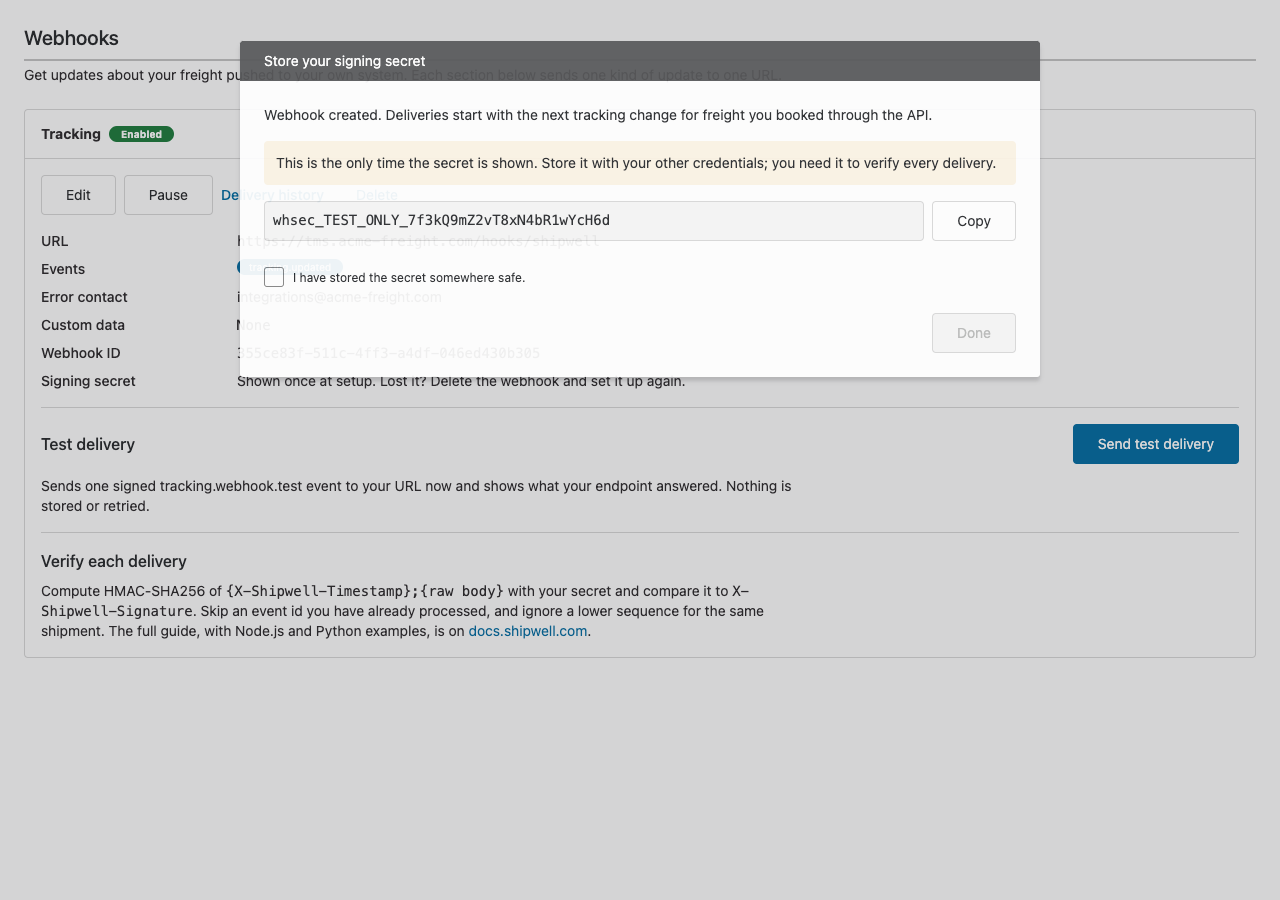
Copy the signing secret. It is shown only this once, and
Done
stays disabled until you confirm you've stored it.
-
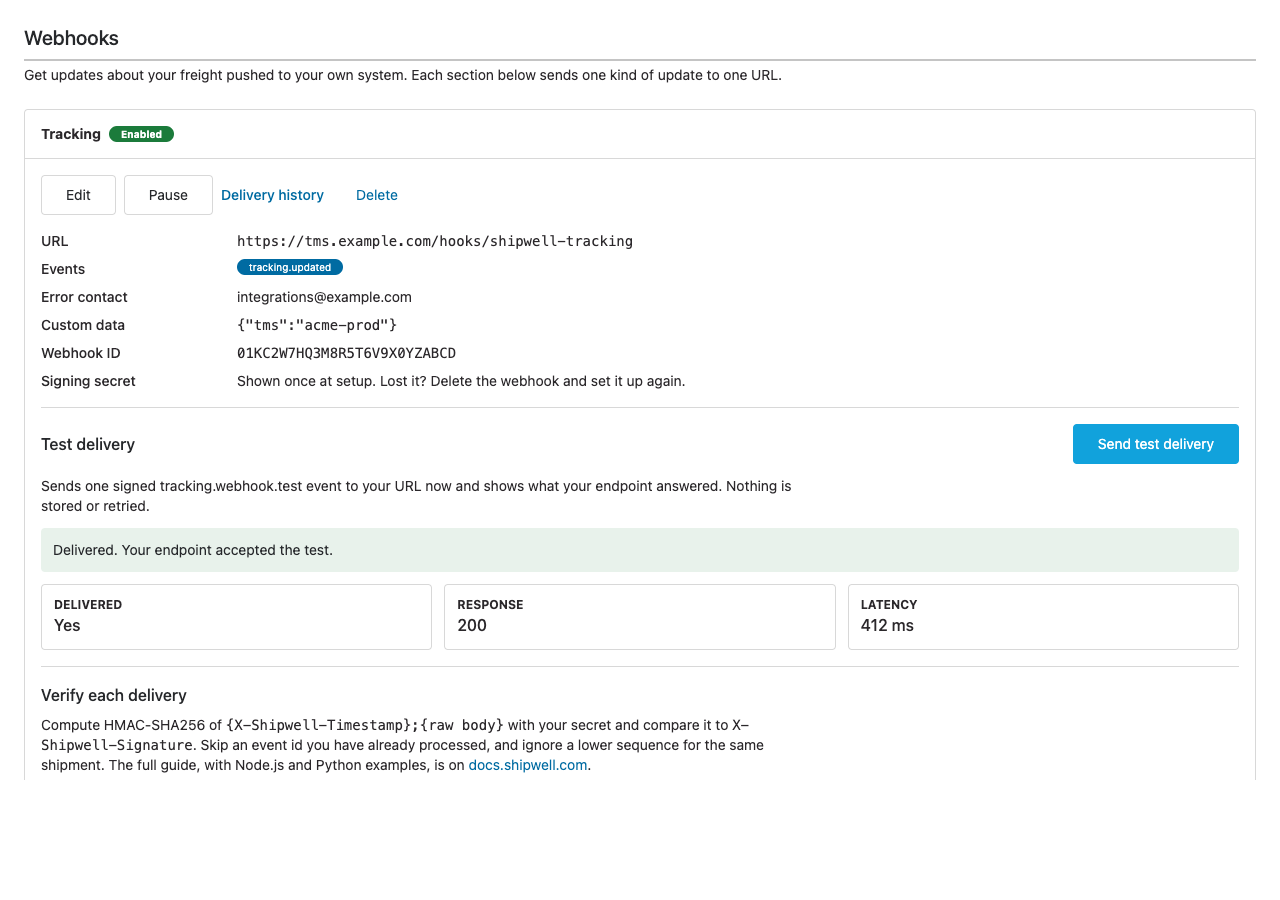
Choose
Send test delivery
. Shipwell sends a signed test event to your URL and shows whether it was delivered, your endpoint's response code and how long it took.
- From the same section you can Edit the URL, events, error contact or custom data, Pause and resume deliveries, or Delete the webhook.
-
Delivery history
lists the last 30 days of deliveries, newest first, with each one's event, status, attempts and your endpoint's last answer. Filter to
Failed
and choose
Retry
on a delivery, or
Retry all failed
after an outage on your side. A retried delivery goes out within about a minute with its original event
id, so your duplicate check still works.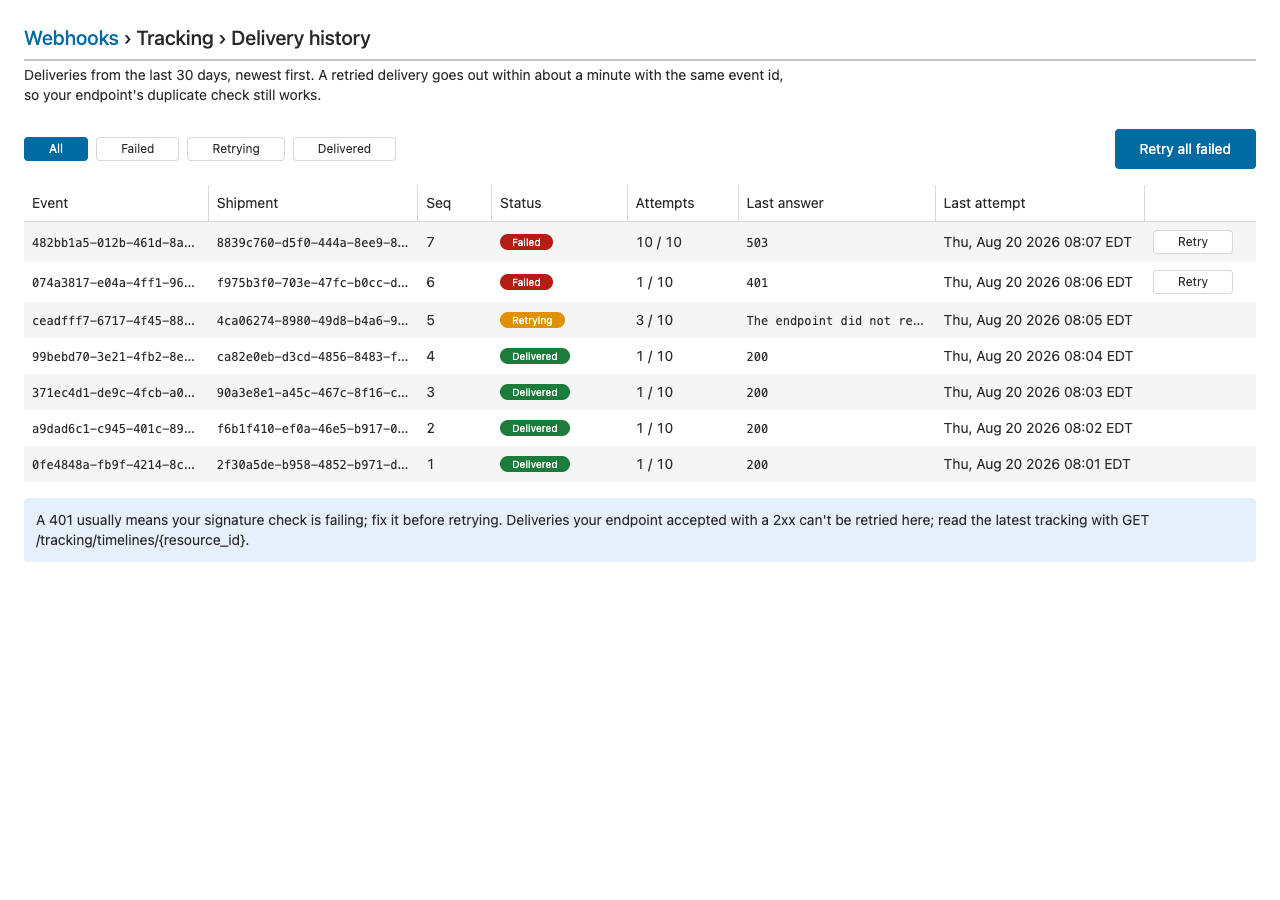
Endpoints
| Endpoint | What it does |
|---|---|
POST /tracking/webhooks |
Register a URL. Returns the webhook id and its signing secret. |
POST /tracking/webhooks/{webhook_id}/test |
Send one signed test event now and see what your endpoint answered. |
The events Shipwell sends, tracking.updated, documents.updated and tracking.webhook.test, are described under Webhooks in the API reference. This page covers tracking; Documents Webhooks covers documents on the same webhook.
Step 1: Register your URL
The steps from here use the REST API. To do the same in the app, see Set it up in the Shipwell app.
A company has one tracking webhook. Registering a second answers 409 with webhook_already_exists.
| Field | Required | Notes |
|---|---|---|
url |
Yes | HTTPS only, resolving to a public address. Up to 2,048 characters, with no username or password in it. |
error_contact_email |
Yes | Who Shipwell contacts if deliveries to your URL keep failing. |
custom_data |
No | Any JSON object up to 4 KB. It comes back as custom_data in every delivery, which is handy for routing, such as your system's environment or tenant. |
event_names |
No | Defaults to ["tracking.updated"]. Add "documents.updated" to receive document changes on the same URL too; see Documents Webhooks. |
Example request
curl --request POST 'https://sandbox-api.shipwell.com/tracking/webhooks' \
--header 'Authorization: Token <user-token>' \
--header 'Content-Type: application/json' \
--data-raw '{
  "url": "https://tms.example.com/hooks/shipwell-tracking",
  "error_contact_email": "integrations@example.com",
  "custom_data": { "tms": "acme-prod" }
}'
Example response (201)
{
  "data": {
    "id": "01KC2W7HQ3M8R5T6V9X0YZABCD",
    "resource_type": "tracking_webhook",
    "self_link": "https://sandbox-api.shipwell.com/tracking/webhooks/01KC2W7HQ3M8R5T6V9X0YZABCD",
    "url": "https://tms.example.com/hooks/shipwell-tracking",
    "event_names": ["tracking.updated"],
    "status": "ENABLED",
    "error_contact_email": "integrations@example.com",
    "custom_data": { "tms": "acme-prod" },
    "created_at": "2026-08-19T15:12:08.102181Z",
    "updated_at": "2026-08-19T15:12:08.102181Z",
    "secret": "whsec_EXAMPLE_DO_NOT_USE"
  }
}
Store the secret now. It is returned only in this response, and you need it to verify every delivery. Keep it where you keep other credentials, never in client-side code or logs.
Step 2: Send a test
Call this right after registering. Shipwell sends one signed tracking.webhook.test event to your URL and answers with what your endpoint did.
Example request
curl --request POST 'https://sandbox-api.shipwell.com/tracking/webhooks/01KC2W7HQ3M8R5T6V9X0YZABCD/test' \
--header 'Authorization: Token <user-token>'
Example response (200)
{
  "data": {
    "delivered": true,
    "response_code": 200,
    "error": null,
    "latency_ms": 412.6
  }
}
The response is 200 whether or not your endpoint accepted the test, so read delivered:
delivered |
response_code |
What to check |
|---|---|---|
true |
2xx |
Nothing. You're ready. |
false |
4xx or 5xx |
Your endpoint answered but refused. Often a signature check failing, or a route or method mismatch: the test is a POST. |
false |
null |
Shipwell couldn't reach your endpoint. error says why: a timeout, a TLS problem, a name that doesn't resolve, or an address that isn't public. |
Shipwell can't see whether your endpoint verified the signature, only what it answered. Make your handler reject a bad signature with a 4xx, so delivered: true also means your check passed.
A test is sent once and never retried or stored. Its body looks like any delivery, with event_name: "tracking.webhook.test", sequence: 0 and a short message in details.
Step 3: Receive tracking.updated
Book freight with POST /dispatching/jobs as usual. Shipwell sends tracking.updated whenever that shipment's tracking changes:
- when tracking starts after the booking,
- when the carrier reports a new movement,
-
when tracking reaches its end, for example
DELIVERED, cancelled or expired.
If a check with the carrier changes nothing, nothing is sent. Several movements reported at once arrive as one event carrying all of them.
Headers
| Header | Value |
|---|---|
X-Shipwell-Signature |
Hex HMAC-SHA256 of {X-Shipwell-Timestamp};{raw request body}, keyed with your webhook's secret. |
X-Shipwell-Timestamp |
When this attempt was signed, as ISO 8601, for example 2026-08-23T17:03:00.064978+00:00. A new value on every retry. |
Content-Type |
application/json; charset=utf-8 |
User-Agent |
shipwell-webhooks |
Example tracking.updated (abridged to two movements)
{
  "id": "01KC2WA3F5G6H7J8K9M0N1P2Q3",
  "event_name": "tracking.updated",
  "occurred_at": "2026-08-23T17:03:00.053997+00:00",
  "webhook_id": "01KC2W7HQ3M8R5T6V9X0YZABCD",
  "source": {
    "publishing_system": "genesis",
    "company_id": "3b1f6c2e-8a4d-4f7b-9c21-5e7d0a9b4c11",
    "environment": "sandbox"
  },
  "custom_data": { "tms": "acme-prod" },
  "sequence": 2,
  "details": {
    "resource_id": "9f2c1b84-6d3a-4c17-9b0e-2f5a7c48d31e",
    "tracking": {
      "resource_id": "9f2c1b84-6d3a-4c17-9b0e-2f5a7c48d31e",
      "resource_type": "tracking",
      "self_link": "https://sandbox-api.shipwell.com/tracking/timelines/9f2c1b84-6d3a-4c17-9b0e-2f5a7c48d31e",
      "tracking_status": "COMPLETED",
      "is_terminal": true,
      "current_state": "DELIVERED",
      "current_state_at": "2026-08-23T16:40:00Z",
      "provider_code": "RLC",
      "carrier_name": "R+L Carriers",
      "carrier_scac": "RLCA",
      "tracking_reference_kind": "PRO_NUMBER",
      "tracking_reference": "123456789",
      "events": [
        {
          "id": "01KBZD4Q6W0000000000000001",
          "occurred_at": "2026-08-20T14:05:00Z",
          "recorded_at": "2026-08-20T14:31:02.118Z",
          "description": "Shipment picked up",
          "carrier_status_code": "PKP",
          "shipment_state": "AT_PICKUP",
          "provider_code": "RLC",
          "location": { "city": "CHARLOTTE", "state": "NC", "postal_code": "28202", "country": "US" },
          "latitude": 35.22709,
          "longitude": -80.84313
        },
        {
          "id": "01KBZD4Q6W0000000000000009",
          "occurred_at": "2026-08-23T16:40:00Z",
          "recorded_at": "2026-08-23T17:02:41.550Z",
          "description": "Delivered",
          "carrier_status_code": "DEL",
          "shipment_state": "DELIVERED",
          "provider_code": "RLC",
          "location": { "city": "RALEIGH", "state": "NC", "postal_code": "27601", "country": "US" },
          "latitude": 35.77959,
          "longitude": -78.63818
        }
      ],
      "next_cursor": null
    }
  }
}| Field | Meaning |
|---|---|
id |
This event's id. The same on every retry of it, so use it to spot duplicates. |
event_name |
tracking.updated, or tracking.webhook.test for a test. |
occurred_at |
When Shipwell created the event. Carrier times are on each movement. |
webhook_id |
Which of your webhooks this delivery is for. |
source |
Who sent it. company_id is your company, and environment tells sandbox from production. |
custom_data |
Exactly what you registered, echoed back. |
sequence |
Increases for each resource_id. It never goes backwards, and it can skip numbers. |
details.resource_id |
The shipment, as returned by the dispatch. |
details.tracking |
The full tracking, the same TrackingResult that GET /tracking/timelines/{resource_id} returns under data. Every movement so far is included in this one document, not paged and not only the new ones, so next_cursor is always null. |
Verify every delivery
Before trusting a delivery, check its signature:
- Take the raw request body , exactly as received. Don't parse and re-serialize it first: a single changed space breaks the signature.
-
Build the string
{X-Shipwell-Timestamp};{raw body}. -
Compute HMAC-SHA256 of it, keyed with your webhook's
secret, as lowercase hex. -
Compare it with
X-Shipwell-Signaturein constant time. If they differ, answer401and ignore the delivery.
To guard against replays, also reject a delivery whose X-Shipwell-Timestamp is more than a few minutes old. Retries are signed afresh, so a genuine retry always passes this check.
Node.js (Express)
const crypto = require("crypto");
const express = require("express");

const app = express();
const SECRET = process.env.SHIPWELL_WEBHOOK_SECRET; // the whsec_... value from registration

// express.raw keeps the body as the exact bytes Shipwell signed.
app.post("/hooks/shipwell-tracking", express.raw({ type: "application/json" }), async (req, res) => {
  const timestamp = req.get("X-Shipwell-Timestamp") || "";
  const received = req.get("X-Shipwell-Signature") || "";
  const expected = crypto
    .createHmac("sha256", SECRET)
    .update(`${timestamp};${req.body.toString("utf8")}`)
    .digest("hex");

  const valid =
    received.length === expected.length &&
    crypto.timingSafeEqual(Buffer.from(received), Buffer.from(expected));
  const fresh = Math.abs(Date.now() - Date.parse(timestamp)) < 5 * 60 * 1000;
  if (!valid || !fresh) return res.sendStatus(401);

  const event = JSON.parse(req.body);
  try {
    await storeDurably(event); // your queue or database: resolve only once the event is persisted
  } catch (err) {
    return res.sendStatus(503); // not stored, so let Shipwell retry
  }
  res.sendStatus(204); // acknowledge after storing, process afterwards
});
Python (Flask)
import hashlib
import hmac
import os
from datetime import datetime, timedelta, timezone

from flask import Flask, abort, request

app = Flask(__name__)
SECRET = os.environ["SHIPWELL_WEBHOOK_SECRET"]  # the whsec_... value from registration


@app.post("/hooks/shipwell-tracking")
def shipwell_tracking():
    timestamp = request.headers.get("X-Shipwell-Timestamp", "")
    received = request.headers.get("X-Shipwell-Signature", "")
    body = request.get_data(as_text=True)  # the raw body, exactly as sent
    expected = hmac.new(SECRET.encode(), f"{timestamp};{body}".encode(), hashlib.sha256).hexdigest()

    if not hmac.compare_digest(received, expected):
        abort(401)
    try:
        sent_at = datetime.fromisoformat(timestamp)
    except ValueError:
        abort(401)
    if abs(datetime.now(timezone.utc) - sent_at) > timedelta(minutes=5):
        abort(401)

    try:
        store_durably(request.get_json())  # your queue or database: return only once persisted
    except Exception:
        abort(503)  # not stored, so let Shipwell retry
    return "", 204  # acknowledge after storing, process afterwards
This is the same signing scheme as Shipwell's platform webhooks, so code you already use to verify those works here unchanged.
Handle each delivery
Deliveries are at least once, and they aren't guaranteed to arrive in order. Four rules make that safe:
-
Ignore an
idyou have already processed. A retry after a timeout, or a response Shipwell never saw, sends the same event again. -
Keep the highest
sequenceperresource_id, and ignore anything lower. An older snapshot arriving late must not overwrite a newer one. If your webhook also receivesdocuments.updated, keep it perresource_idandevent_name: each event counts its own sequence. -
Replace, don't merge.
details.trackingis the whole current state, so overwrite your copy of the shipment's tracking with it. There's nothing to reconstruct from differences. -
Store, acknowledge, then process.
Answer
2xxonly once the delivery is verified and stored durably, then do the rest of the work. If you can't store it, answer503and Shipwell retries. A2xxfor an event you then lose can't be recovered by retry.
sequence can skip numbers, so never wait for a missing one. A gap simply means a snapshot you had no webhook to receive.
Mixing pull and push
GET /tracking/timelines/{resource_id} returns the current tracking but carries no sequence, so it can't be ordered against deliveries. A delivery that was being retried while you pulled may hold an older snapshot than the one you pulled, and no later change is guaranteed to correct it. So:
-
Keep applying deliveries by
sequenceas usual. - After applying any delivery that arrives after a pull, pull that shipment again. A retry can arrive hours later.
-
Never let a snapshot with
is_terminal: falsereplace one withis_terminal: true. A finished shipment sends no further changes.
Retries
| Your endpoint answers | What Shipwell does |
|---|---|
Any 2xx |
Done. |
A timeout (over 10 seconds), a network or TLS error, 408, 429 or 5xx |
Retries after 30 seconds, then 2 minutes, 10 minutes, 30 minutes, 1 hour, 3, 6, 12 and 24 hours: 10 attempts over about 47 hours. A Retry-After header on a 429 or 503 is honoured. |
410 Gone |
Stops, and disables the webhook. Use it when you've retired the URL. |
Any other 4xx, or a 3xx |
Stops, without retrying: a refusal won't change on its own. Redirects are not followed. |
Every retry of an event carries the same id and body, with a new X-Shipwell-Timestamp and signature. The one exception is documents.updated, whose file download links are made fresh for each attempt; see Documents Webhooks. To send a failed delivery again yourself, use Retry in Delivery history. If an event exhausts its retries, the next change to that shipment still sends the full, current snapshot, and GET /tracking/timelines/{resource_id} always has it.
Pause, change or remove a webhook
Use Edit, Pause and Delete in the Tracking section of Company → Webhooks in the Shipwell app. Pausing stops deliveries until you resume; a delivery can't be retried while its webhook is paused. To stop deliveries from your side at once, answer 410 Gone: Shipwell disables the webhook on the first one, and you can resume it in the app.
Errors
| Status | code |
Meaning |
|---|---|---|
400 |
The request body is invalid, for example a URL that isn't HTTPS, points at a private address, or contains whitespace. errors[].source.pointer names the field. |
|
401 |
The Authorization header is missing or invalid. Send Authorization: Token <user-token>. |
|
403 |
webhooks_not_enabled |
Tracking webhooks aren't enabled for your company yet. Contact your Shipwell representative. |
403 |
documents_webhooks_not_enabled |
event_names includes documents.updated, which isn't enabled for your company yet. See Documents Webhooks. |
409 |
webhook_already_exists |
Your company already has a tracking webhook. Change its URL instead of registering another. |
404 |
webhook_not_found |
No webhook with that id for your company. Another company's webhook answers the same as one that doesn't exist. |
429 |
Too many requests. Wait a moment and try again. | |
503 |
webhooks_unavailable |
Tracking webhooks aren't available in this environment yet. |
Troubleshooting
| Symptom | Check |
|---|---|
The test says delivered: false with response_code: null |
That your URL is reachable from the internet over HTTPS with a valid certificate, and resolves to a public address. |
| The test reaches you, but your signature check fails | That you hash the raw body, not a parsed and re-serialized copy, and use the secret from this webhook's registration. |
The test works, but no tracking.updated arrives |
That the freight was booked through POST /dispatching/jobs by the same company, and that its tracking has changed since you registered. Changes before registration aren't sent. GET /tracking/timelines/{resource_id} shows the current state. |
| The same event arrives twice | Expected with at-least-once delivery. Skip an id you've already processed. |
| Deliveries stopped | Delivery history in the app: failed deliveries show your endpoint's last answer. Check the webhook isn't paused; a 410 Gone answer pauses it. Fix your endpoint, then Retry all failed. |
API reference
Tracking Webhooks API reference: both endpoints and both event payloads, with every field.
Next steps
Read Tracking for what the tracking document's fields and states mean, and have the shipment's documents pushed to the same webhook or pull them as it nears delivery.