Direct Carrier Connections
Direct Carrier Connections is one API for the LTL and Volume LTL carriers you already work with: Estes, XPO, Old Dominion, FedEx Freight, Saia, R+L, ABF and twenty more. You connect each carrier once in Shipwell. From then on you rate, book, track and pull documents from every one of them with the same eleven endpoints, the same request shapes and the same responses.
Every carrier's own API is different: SOAP for one, REST for the next, its own field names, its own authentication, its own status codes. Shipwell absorbs all of that. Your code sends one request shape and reads one response shape, whichever carrier is hauling the freight.
What you can do
| Capability | Endpoint | What it does |
|---|---|---|
| Rating | POST /rating/jobs |
Quote every eligible carrier on an account in one call. |
GET /rating/jobs/{rating_job_id} |
Read the job, then every rate it collected. | |
GET /rating/jobs/{rating_job_id}/rates/{rate_id} |
Read one rate on its own. | |
| Dispatching | POST /dispatching/jobs |
Book a rate with one field, or book a shipment you state in full. |
GET /dispatching/jobs/{dispatch_job_id} |
Read the carrier's answer, with its pickup and PRO numbers. | |
POST /dispatching/jobs/{resource_id}/cancel |
Cancel a booking. | |
| Tracking | GET /tracking/timelines/{resource_id} |
Read where the freight is, and every movement the carrier reported. |
| Tracking webhooks | POST /tracking/webhooks |
Register your URL once; every tracking change for freight booked through POST /dispatching/jobs is pushed to it, signed. |
POST /tracking/webhooks/{webhook_id}/test |
Send a signed test event and see what your endpoint answered. | |
| Documents | GET /documents/{resource_id} |
Read the BOL, delivery receipt and other carrier documents. |
GET /documents/{resource_id}/{document_type} |
The same, narrowed to one document type. | |
| Documents webhooks | POST /tracking/webhooks |
Add documents.updated to your webhook; every document change is pushed to the same URL, signed, with a download link on each file. |
The electronic bill of lading and PRO number need no call of their own. Shipwell requests them from the carrier as part of the booking. See eBOL & PRO Numbers.
Why teams build on it
| What you get | How it works |
|---|---|
| Live in minutes, with nothing else to learn | Your integration user signs in to a Shipwell application with just two menus, Carriers and API Keys. You connect carriers and get your API token yourself, without Shipwell support in the loop. See Getting Started. |
| Credentials checked before you save | Shipwell tests each carrier's credentials with the carrier live, before the account is added. A wrong password shows up during setup, not on your first booking. |
| Every carrier quoted at once, first rates first | One rating job quotes every eligible carrier in parallel, and each carrier's rates are readable the moment it answers. You show the first prices without waiting for the slowest carrier. LTL and Volume LTL go through the same request. |
| Booking in one field | Send the rate_id and you're booked. Where the carrier issues them, the eBOL and PRO number are requested as part of the same booking, with no second call. |
| One id for the freight's whole life | The booking returns a resource_id. Tracking, documents and cancellation are all read by it. |
| Waits that end, retries that are safe | Rating jobs, dispatch jobs, tracking and documents all carry is_terminal, and every job is guaranteed to reach it, even if a carrier never answers. An Idempotency-Key makes a retried booking return the original instead of tendering a second pickup. |
| No surprise breaking changes | Pin requests to the API as it behaved on a given date with X-Shipwell-Version. A client that never sends it keeps the behaviour it was written against. |
| Carrier rate limits handled for you | Shipwell paces calls to each carrier within its own limits, per carrier account. Your volume spikes never trip a carrier's limit or lose an update. |
| Health watched per carrier, per operation | Rating, dispatch, tracking and documents are monitored separately for every carrier. That way a carrier whose tracking is slow but whose rating is healthy is seen for exactly what it is. Platform status is at status.shipwell.com. |
| Tracking that keeps getting better | Every carrier's status codes map to one set of shipment states, next to the carrier's own words. When Shipwell improves a mapping, it applies to history already recorded, too. |
| One consistent, private API | The same self_link, status and errors shape on every resource, whichever carrier is behind it. Everything is scoped to your company, and another company's id answers exactly as one that doesn't exist. |
How it fits together
One id follows the freight from booking to delivery. The dispatch response gives you a resource_id, and tracking and documents are both read by that same id. Tracking and documents can also come to you: register a tracking webhook once, add documents to it if you want them, and every change is pushed to your URL.
The full lifecycle
Everything above on one page: the one-time setup for each carrier account, then the life of each shipment from quote to documents.
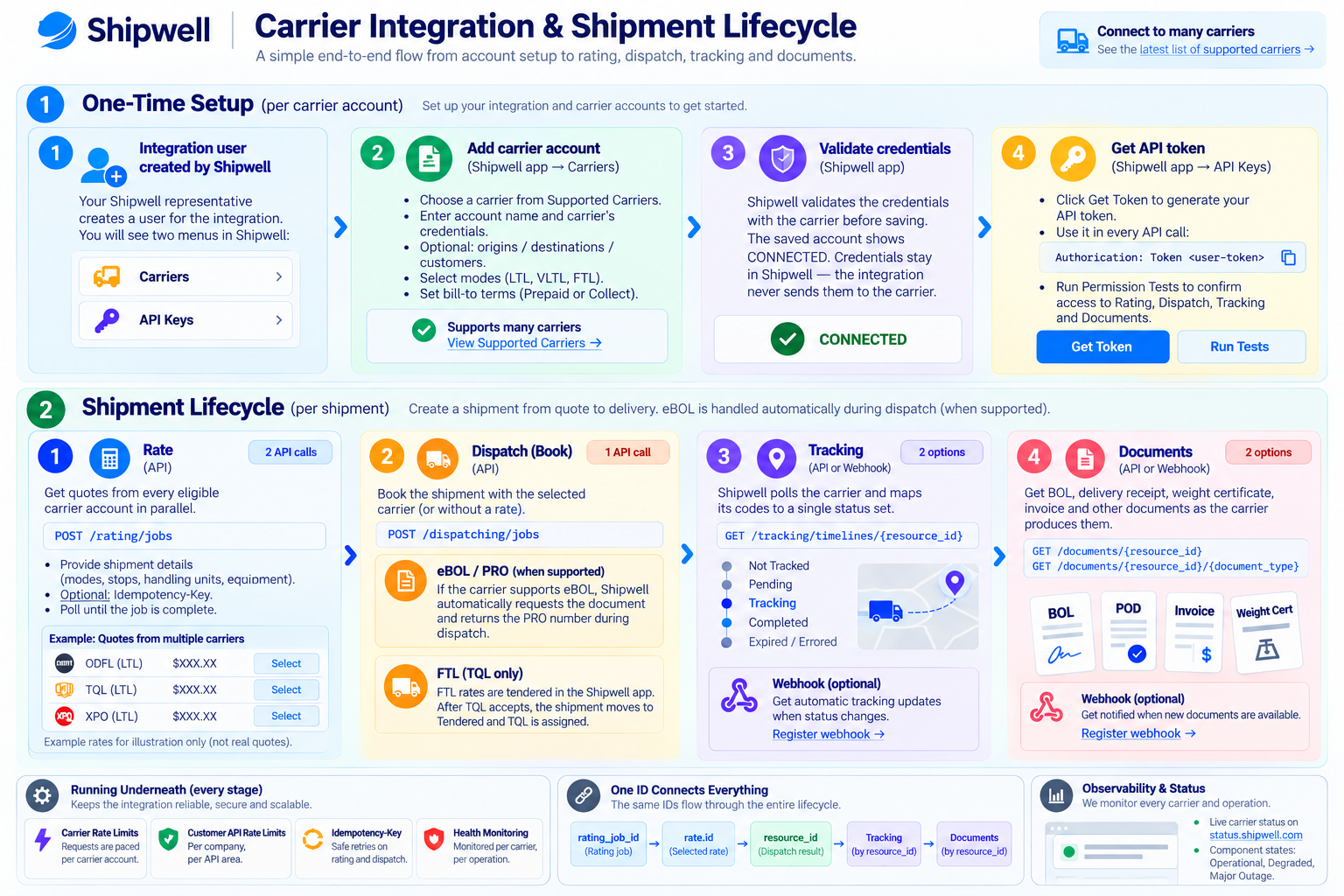
Tracking and documents through this API follow shipments booked with POST /dispatching/jobs, which returns the resource_id they're read by. A TQL FTL load tendered in the Shipwell app has no resource_id here, so you follow it in the app.
Each step has its own guide: Getting Started for the setup, then Rating, Dispatch, Tracking and Documents. Pushed updates are covered in Tracking Webhooks and Documents Webhooks, and the current carrier list is in Supported Carriers.
Built for production
Carrier APIs rate-limit, slow down and occasionally go dark. Every call Shipwell makes to a carrier is logged, measured and watched by our integrations team on live dashboards. When a carrier changes its API or starts failing, we fix the integration on our side, and your code doesn't change. See Reliability & Status for how throttling, bounded jobs, safe retries and carrier health work.
Access
Direct Carrier Connections must be enabled for your Shipwell account, and each carrier is connected individually. Contact your Shipwell representative to enable it.
API requests use your normal Shipwell credentials, sent as Authorization: Token <user-token>. See Authentication and Environments. The carrier's own account credentials are entered once when you connect the carrier, and your integration never handles them.
API reference
The full request and response schemas, with examples and code samples in several languages, are in the Direct Carrier Connections API reference.
Start here
Follow Getting Started to connect your first carrier and request your first rates.