Tracking
Tracking tells you where booked freight is, and shows every movement its carrier reported, in one call. There's nothing to set up: Shipwell starts tracking a shipment when its dispatch completes, and you read it by the resource_id the dispatch gave you.
Prefer push to polling?
Register a tracking webhook and, for freight booked through POST /dispatching/jobs, Shipwell sends this same tracking to your URL every time it changes, so you don't have to poll.
How it works
- Shipwell watches the carrier for you. Once the carrier confirms a booking, Shipwell polls it for movements, within its rate limits, until the shipment is delivered.
-
Every carrier speaks the same language.
Each carrier's own status codes, such as R+L's
PKPandDEP, map to one set of shipment states, published ascurrent_state. You write no carrier-specific logic. -
Nothing the carrier said is lost.
Each movement keeps the carrier's own
carrier_status_codeanddescriptionnext to the normalizedshipment_state, so you can show the carrier's exact words too. -
Corrections reach history.
current_stateis worked out when you read, not frozen when the movement arrived. When Shipwell improves how a carrier's code is understood, movements already recorded benefit too.
Endpoint
| Endpoint | What it does |
|---|---|
GET /tracking/timelines/{resource_id} |
Read the shipment's tracking state and its movements, oldest first. |
| Query parameter | What it does |
|---|---|
limit |
Movements per page, 1 to 250. Defaults to 100. A timeline is normally tens of movements, so one page is the usual case. |
cursor |
The next_cursor from the previous page, passed back unchanged. |
Example request
curl --request GET 'https://sandbox-api.shipwell.com/tracking/timelines/9f2c1b84-6d3a-4c17-9b0e-2f5a7c48d31e' \
--header 'Authorization: Token <user-token>'
Example response (200)
{
  "data": {
    "resource_id": "9f2c1b84-6d3a-4c17-9b0e-2f5a7c48d31e",
    "resource_type": "tracking",
    "self_link": "https://sandbox-api.shipwell.com/tracking/timelines/9f2c1b84-6d3a-4c17-9b0e-2f5a7c48d31e",
    "tracking_status": "TRACKING",
    "is_terminal": false,
    "current_state": "IN_TRANSIT",
    "current_state_at": "2026-08-21T22:14:00Z",
    "provider_code": "RLC",
    "carrier_name": "R+L Carriers",
    "carrier_scac": "RLCA",
    "tracking_reference_kind": "PRO_NUMBER",
    "tracking_reference": "123456789",
    "events": [
      {
        "id": "01KBZD4Q6W0000000000000001",
        "occurred_at": "2026-08-20T14:05:00Z",
        "recorded_at": "2026-08-20T14:31:02.118Z",
        "description": "Shipment picked up",
        "carrier_status_code": "PKP",
        "shipment_state": "AT_PICKUP",
        "provider_code": "RLC",
        "location": {"city": "CHARLOTTE", "state": "NC", "postal_code": "28202", "country": "US"},
        "latitude": 35.22709,
        "longitude": -80.84313
      },
      {
        "id": "01KBZD4Q6W0000000000000002",
        "occurred_at": "2026-08-21T22:14:00Z",
        "recorded_at": "2026-08-21T22:47:19.004Z",
        "description": "Departed GREENSBORO, NC in route to destination terminal",
        "carrier_status_code": "DEP",
        "shipment_state": "IN_TRANSIT",
        "provider_code": "RLC",
        "location": {"city": "GREENSBORO", "state": "NC", "country": "US"}
      },
      {
        "id": "01KBZD4Q6W0000000000000003",
        "occurred_at": null,
        "recorded_at": "2026-08-22T09:12:44.005Z",
        "description": "Delayed by weather",
        "carrier_status_code": "WTR",
        "shipment_state": null,
        "provider_code": "RLC",
        "location": null
      }
    ],
    "next_cursor": null
  }
}
Reading the response
Two fields answer two different questions:
-
tracking_statussays whether Shipwell is watching this shipment. -
current_statesays where the freight is.
Read them together when events is empty. TRACKING with no events means Shipwell is watching and the carrier hasn't reported anything yet. NOT_TRACKED means nothing is watching it yet, most often because the carrier hasn't confirmed the booking.
A few more things worth knowing:
-
Stop polling when
is_terminalistrue. A delivered shipment is terminal even while tracking winds down. -
NOT_TRACKEDisn't always final. Straight after booking, it comes withis_terminal: falseuntil the carrier confirms. Keep polling untilis_terminalistrue. -
A movement can have no state.
A delay or a note from the carrier is a real report that doesn't move the freight. It's published with
shipment_state: nulland leavescurrent_statealone, like the weather delay above. -
tracking_referenceshows what Shipwell is asking the carrier about. A carrier that doesn't know a PRO number yet is asked by bill of lading until it does, sotracking_reference_kindcan change fromBOL_NUMBERtoPRO_NUMBER. -
Coordinates are the carrier's own.
latitudeandlongitudeappear only when the carrier sent a point, and are never an estimate made fromlocation. -
An id that isn't yours looks like an id nobody booked.
Both answer
200withNOT_TRACKED, so nothing about another company's shipments leaks.
Paging long timelines
If next_cursor isn't null, pass it back as cursor to read the next page. The walk is live rather than a snapshot. A movement the carrier reports late, with a time before a page you've already read, won't appear in the remaining pages. Read again without a cursor to see the whole timeline. current_state is always worked out over the whole timeline, whichever page you're on.
Shipment states
current_state |
Meaning |
|---|---|
QUOTE_ACCEPTED |
A rate was accepted for the shipment. |
TENDERED |
The shipment was offered to the carrier. |
CARRIER_CONFIRMED |
The carrier accepted the booking. |
DISPATCHED |
The booking is scheduled for pickup. |
AT_PICKUP |
The freight is at the pickup location. |
IN_TRANSIT |
The freight is moving toward its destination. |
AT_DELIVERY |
The freight has arrived at the delivery location. |
DELIVERED |
The freight was delivered. |
EXCEPTION |
Something unexpected happened, such as damage or a missed appointment. |
CANCELLED |
The shipment was cancelled. |
For tracking_status values, see Statuses.
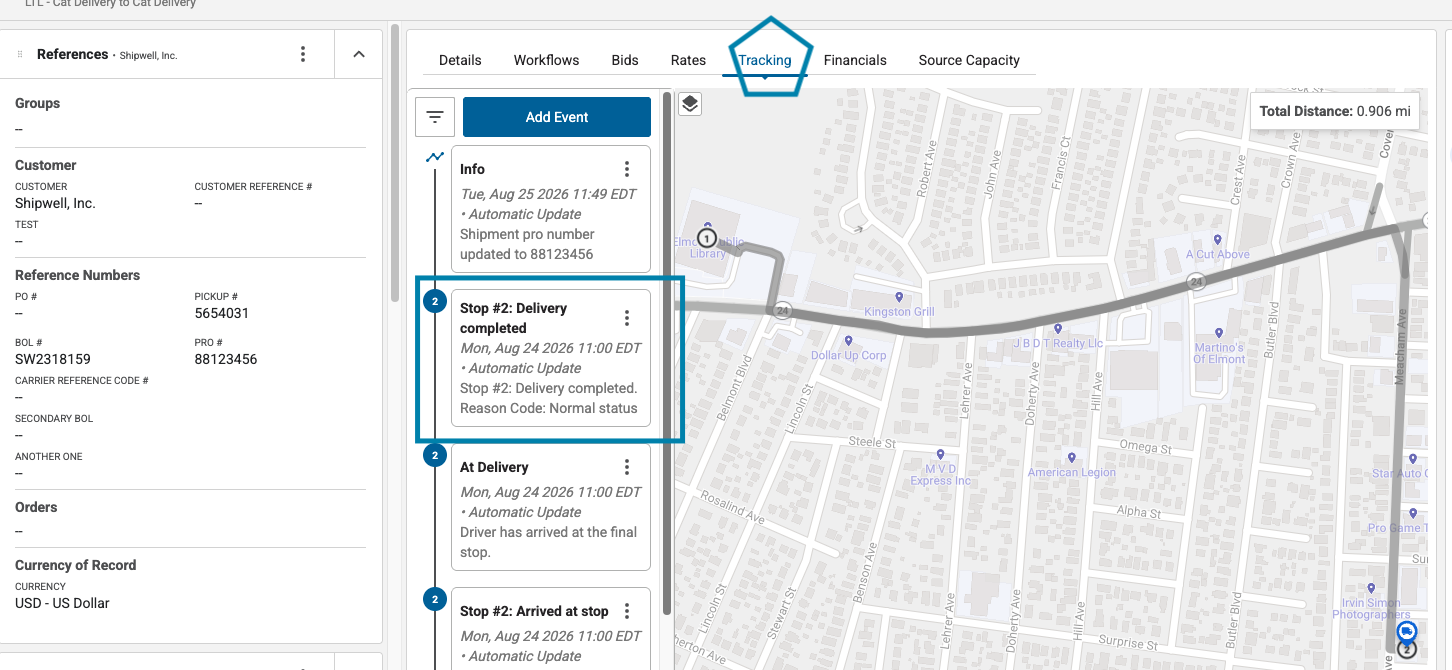
The same movements appear on the shipment's Tracking tab in the Shipwell application, plotted along the route:
API reference
Tracking API reference: every field, with examples and code samples.
Next steps
To have changes pushed to you instead of polling, set up Tracking Webhooks. As the shipment nears delivery, pull its documents, such as the delivery receipt.