Documents
Documents returns the paperwork a carrier produces for a booked shipment, such as the bill of lading, the delivery receipt and weight certificates. You never have to log in to a carrier's portal. Shipwell retrieves the documents for you, and you read them all by the resource_id the dispatch gave you.
How it works
- Shipwell retrieves documents for you. After a booking, Shipwell asks the carrier for its documents and keeps asking, within the carrier's rate limits, while they're still being produced.
- Every document is deduplicated. However many times Shipwell checked, you get each document once.
-
An early empty answer is normal.
Carriers commonly index images only after delivery. An empty
documentslist withis_terminal: falsemeans "nothing yet", so keep polling. -
Pushed to you, if you like.
Add
documents.updatedto your webhook and every change to the collection is sent to your URL, with a download link on each file. See Documents Webhooks . -
Links, or the file itself.
By default each file comes as a link. Ask for
encoding=base64and small enough files are inlined as well, so you can store them without a second download.
Endpoints
| Endpoint | What it does |
|---|---|
GET /documents/{resource_id} |
Every document retrieved for the shipment so far. |
GET /documents/{resource_id}/{document_type} |
The same collection, narrowed to one type, for example BOL. |
| Query parameter | What it does |
|---|---|
encoding |
url (the default) returns links. base64 also inlines the file content where it's available and small enough. It adds to the link rather than replacing it. |
Example request
curl --request GET 'https://sandbox-api.shipwell.com/documents/9f2c1b84-6d3a-4c17-9b0e-2f5a7c48d31e' \
--header 'Authorization: Token <user-token>'
Example response (200)
{
  "data": {
    "resource_id": "9f2c1b84-6d3a-4c17-9b0e-2f5a7c48d31e",
    "resource_type": "document_collection",
    "self_link": "https://sandbox-api.shipwell.com/documents/9f2c1b84-6d3a-4c17-9b0e-2f5a7c48d31e",
    "status": "COMPLETED",
    "is_terminal": true,
    "documents": [
      {
        "id": "01KBZD1P4M0000000000000000",
        "resource_type": "document",
        "document_type": "BOL",
        "name": "Bill of Lading",
        "status": "COMPLETED",
        "completed_at": "2026-08-20T11:04:18.220Z",
        "files": [
          {
            "filename": "bol-77120.pdf",
            "format": "PDF",
            "size_in_bytes": 184223,
            "too_large_for_inline": false,
            "content": {"url": {"value": "https://example.com/bol-77120.pdf"}}
          }
        ]
      }
    ],
    "errors": []
  }
}
Reading the response
-
Stop polling when
is_terminalistrue.statusisPROCESSINGwhile retrieval is still running, thenCOMPLETEDorERRORED. -
If retrieval failed,
errorssays why. - A type can appear more than once. A multi-stop shipment can have two bills of lading, so the filtered endpoint still returns an array.
-
The filtered endpoint reports the whole shipment's status.
While other document types are still being retrieved,
GET /documents/{resource_id}/BOLstaysPROCESSINGeven if the BOL already arrived. The BOL is already indocuments, so you can use it straight away. -
No match isn't an error.
Zero documents of a type is a
200with an empty list. That way an early poll never looks like "this type will never exist". -
An id that isn't yours answers
404, exactly like an id that doesn't exist.
Document types
The document_type values you're most likely to see are BOL, DELIVERY_RECEIPT, WEIGHT_CERTIFICATE, INVOICE, RATE_CONFIRMATION, SHIPPING_LABEL and CUSTOMS_PAPERWORK. The full list is in the API reference. Which types a carrier produces depends on the carrier.
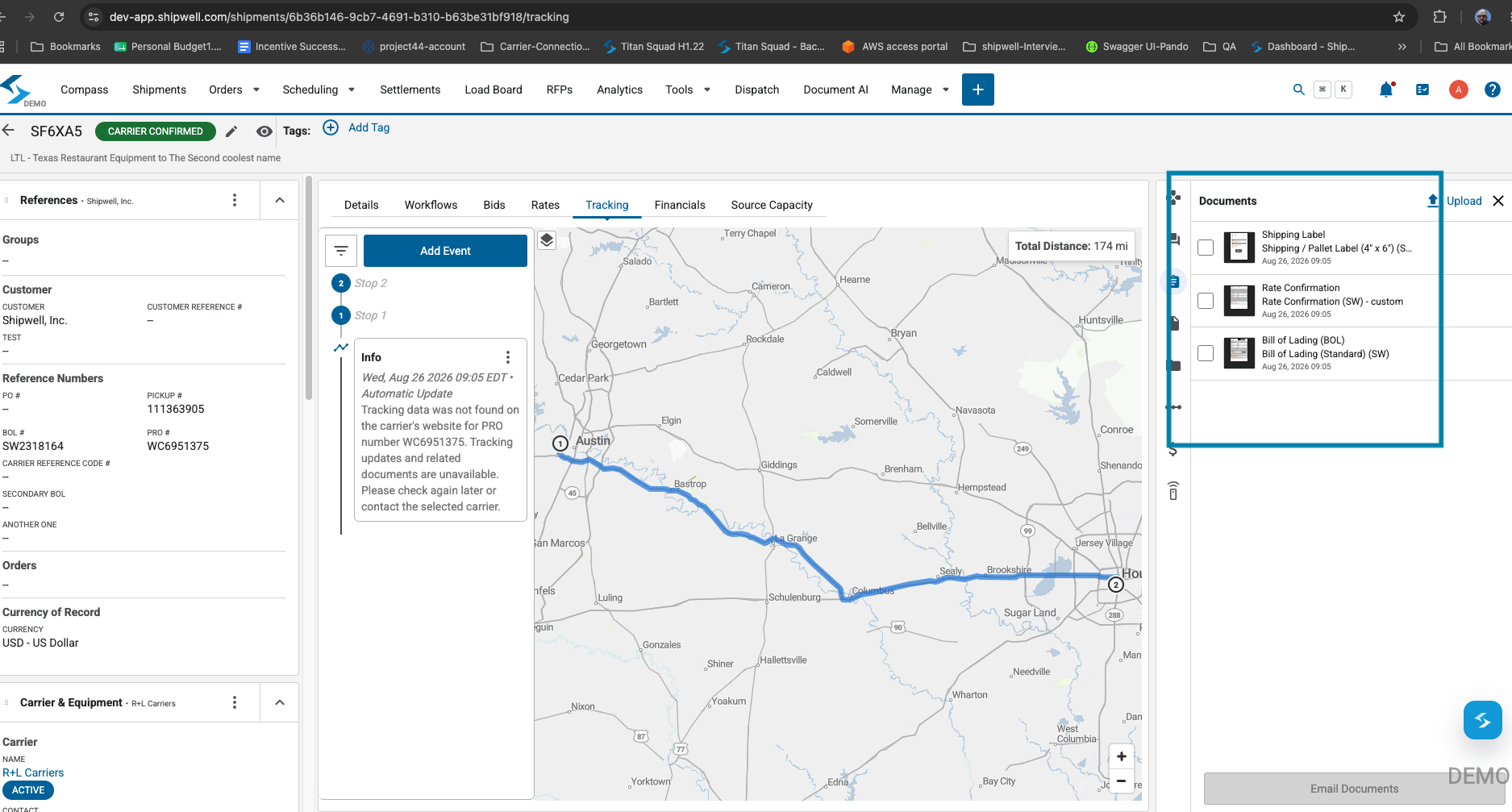
Retrieved documents also appear on the shipment's Documents panel in the Shipwell application:
API reference
Documents API reference: every field, with examples and code samples.
Next steps
See Supported Carriers for which carriers support document retrieval.