eBOL & PRO Numbers
For carriers that issue them, Shipwell requests the electronic bill of lading (eBOL) and PRO number as part of the booking itself. There's no separate eBOL call to make, and no second status to poll. It's switched on per carrier account with the Allow PRO # assignment from carrier setting (see below).
How it works
- You dispatch the shipment as usual.
- Once the carrier accepts the pickup, Shipwell requests the eBOL. For XPO, the eBOL request is the pickup booking.
-
The dispatch job stays
PROCESSINGuntil the eBOL answer is in, so reachingCOMPLETEDmeans the whole booking is done. -
The carrier's PRO number is added to the dispatch job's
references, next to its pickup number:
"references": [
  {"qualifier": "BOL_NUMBER", "value": "BOL-77120"},
  {"qualifier": "PICKUP_NUMBER", "value": "PU-448201"},
  {"qualifier": "PRO_NUMBER", "value": "123456789"}
]
Tracking uses that PRO number to follow the shipment. Until the carrier knows it, tracking asks by bill of lading instead. You can see which one is in use in tracking_reference_kind on the tracking timeline.
To get the bill of lading document itself, read GET /documents/{resource_id}/BOL.
Note
ABF assigns its PRO number during dispatch itself instead of through a separate eBOL request. For ABF, the PRO number is in references as soon as the dispatch completes.
If the eBOL fails
For most carriers, the pickup has already been booked by the time the eBOL is requested. If the eBOL fails, the dispatch still completes, just without a carrier PRO number. For XPO, where the eBOL is the booking, a failed eBOL fails the dispatch, and the reason is in errors.
Who assigns the PRO number
Each carrier account has a PRO # Generation setting in the Shipwell application:
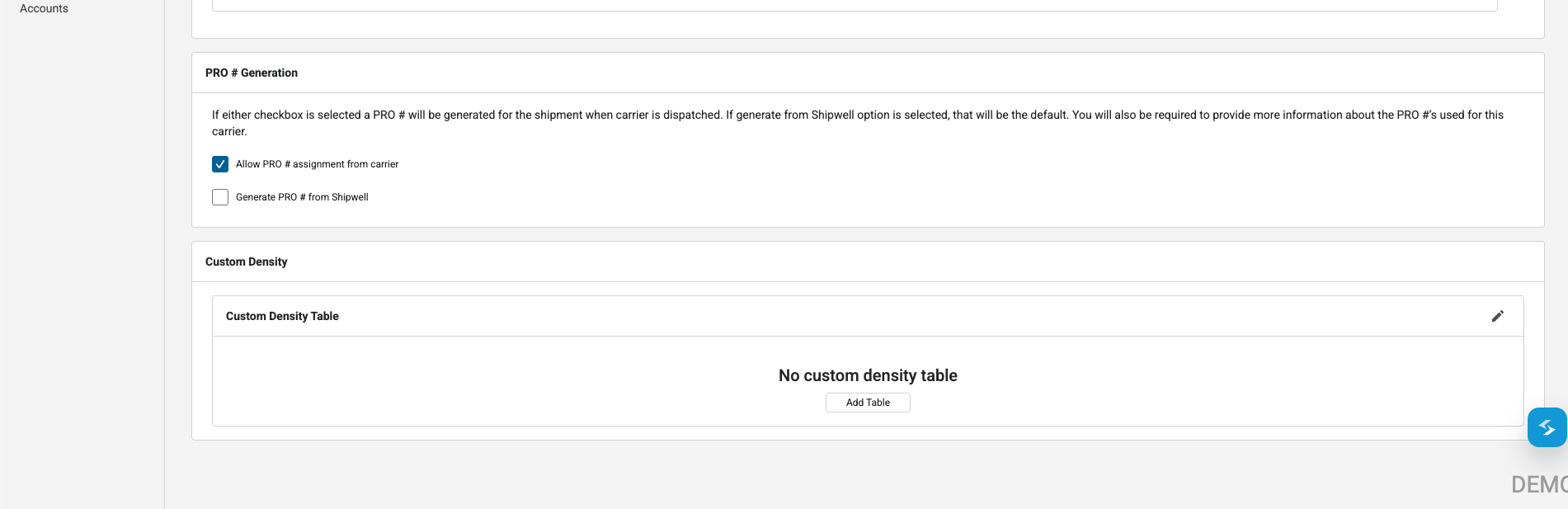
- Allow PRO # assignment from carrier : the carrier assigns the PRO number. It comes back in the eBOL response or, for some carriers, in a later tracking update.
- Generate PRO # from Shipwell : Shipwell assigns the PRO number when the shipment is dispatched, and no eBOL is requested from the carrier for it.
If neither is set, no PRO number is generated for that carrier account.
Which carriers issue eBOLs is shown in Supported Carriers.
Next steps
Track the shipment to delivery, then pull its delivery documents.